
“With PowerShell being supported on Windows, Linux, Azure Functions, AWS Lambdas, PowerApps. and elsewhere, it is our favorite scripting runtime. It is very easy to integrate with Vanta Private Integrations.“
Eric Shoemaker – Advisory CISO – Genius GRC
Private integrations – An Overview
Before you read this post, you should check out our Vanta Private Integrations primer post. It provides relevant resources to build your integration along with helpful tips and some limitations to be aware of.
Combining AD With Vanta Automation
Active Directory Domains are ubiquitous. They’ve been around longer than the internet, and there are very good reasons to maintain them as a primary identity source. Auditors understand what to look for, and securing your joined computers is relatively easy with Group Policy. It just makes sense to be able to integrate AD Users with Vanta. At this point in time (9/15/2023), it’s best used to support entitlement reviews, but we believe that Private Integrations will eventually allow you to leverage AD as a primary identity provider. This post explains how to use the Vanta Private Integrations feature with AD. We even throw in some freebie PowerShell functions to make the integration much easier.
Create a New Application in Vanta
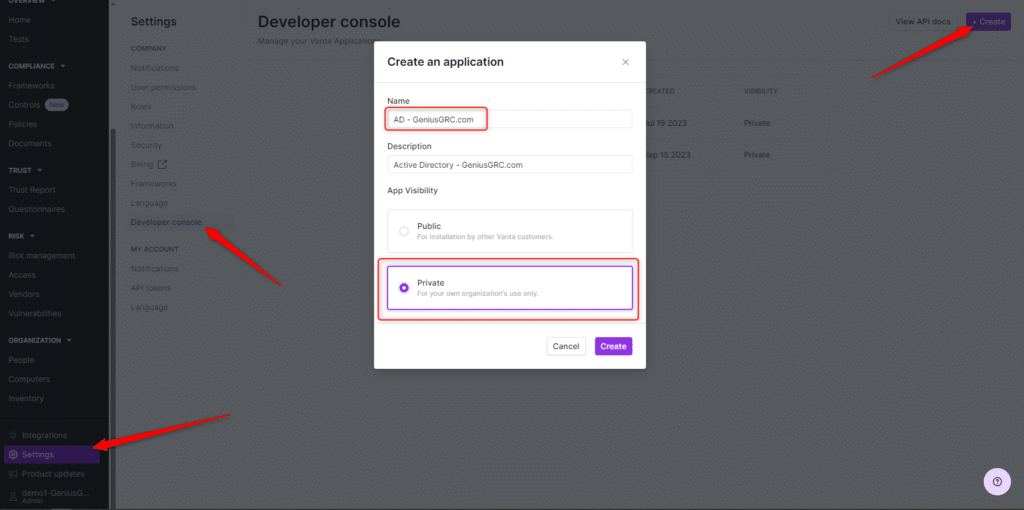
Logon to your Vanta tenant and navigate to Settings -> Developer Console. If this doesn’t exist, you may need to request access to the developer console. Genius GRC managed customers have it enabled automatically.
- In the Developer Console, click the + Create button at the top right to create the application.
- Name the application. We leverage the nomenclature. We are going to name it AD – GeniusGRC.com.
- Set a Description and set the App Visibility to Private.
- Click Create
- Select the Application Categories the application supports. As “Identity Provider” is not an option at this time, we will choose Other.
- Click Generate Client Secret
- Make note of the OAuth Client ID the generated Client Secret and save it for later. You will need this in your script later on. This is the only time you can copy the Client Secret.
- Click Save
- Click the Resources tab.

- On the Resources tab, click + Create Resource.
- Name the resource AD Users and set the base resource type to UserAccount.
- Note the JSON Schema. If you don’t use the PowerShell function provided in this post, you will need to build the UserAccount objects according to this schema.
- Click Create.
- Make note of the Resource ID. You will need it later in the script.
- This completes the Vanta portion of the Private Integration.

PowerShell Freebies. Help for Your Vanta Integration
We’ve created 3 custom functions to make your Vanta integration easier. These format the objects appropriately and sync them to Vanta.
- Get-VantaOAuthToken
- New-VantaUserObject
- Invoke-VantaUserSyncAll
Function Get-VantaOAuthToken
{
    [cmdletbinding()]
    param
    (
        [Parameter(Mandatory = $true, ValueFromPipeline=$true)]
        [string]$VantaClientID,
        [Parameter(Mandatory = $true, ValueFromPipeline=$true)]
        [string]$VantaClientSecret
    )


    $headers=@{}
    $headers.Add("content-type", "application/json")

    $Body=@{}
    $Body.Add("client_id", "$VantaClientID")
    $Body.Add("client_secret", "$VantaClientSecret")
    $Body.Add("grant_type", "client_credentials")
    $Body.Add("scope", "connectors.self:write-resource connectors.self:read-resource")

    $BodyJSON=$Body | ConvertTo-Json
    $request=Invoke-WebRequest -Uri 'https://api.vanta.com/oauth/token' -Method Post -Headers $headers -Body $BodyJSON
    $request.Content | ConvertFrom-Json
}
Function New-VantaUserObject
{
[CmdletBinding()]
param
(
[Parameter(Mandatory=$true, ValueFromPipelineByPropertyName=$true)]
[string]$displayName,
[Parameter(Mandatory=$true, ValueFromPipelineByPropertyName=$true)]
[string]$uniqueId,
[Parameter(Mandatory=$true, ValueFromPipelineByPropertyName=$true)]
[string]$externalUrl,
[Parameter(Mandatory=$true, ValueFromPipelineByPropertyName=$true)]
[string]$fullName,
[Parameter(Mandatory=$true, ValueFromPipelineByPropertyName=$true)]
[string]$accountName,
[Parameter(Mandatory=$true, ValueFromPipelineByPropertyName=$true)]
[string]$email,
[Parameter(Mandatory=$true, ValueFromPipelineByPropertyName=$true)]
[ValidateSet('ADMIN','EDITOR','BASE')]
[string]$permissionLevel,
[Parameter(Mandatory=$true, ValueFromPipelineByPropertyName=$true)]
[System.DateTime]$createdTimestamp,
[Parameter(Mandatory=$true, ValueFromPipelineByPropertyName=$true)]
[ValidateSet('ACTIVE','DEACTIVATED')]
[string]$status,
[Parameter(Mandatory=$true, ValueFromPipelineByPropertyName=$true)]
[bool]$mfaEnabled,
[Parameter(Mandatory=$true, ValueFromPipelineByPropertyName=$true)]
[ValidateSet('UNSUPPORTED','DISABLED','SMS','EMAIL','OTP','HARDWARE_TOKEN','PUSH_PROMPT')]
[String[]]$mfaMethods,
[Parameter(Mandatory=$true, ValueFromPipelineByPropertyName=$true)]
[ValidateSet('SSO','PASSWORD','TOKEN','BIOMETRIC')]
[string]$authMethod,
[Parameter(Mandatory=$false, ValueFromPipelineByPropertyName=$true)]
[string]$roleDescription,
[Parameter(Mandatory=$false, ValueFromPipelineByPropertyName=$true)]
[System.DateTime]$updatedTimestamp,
[Parameter(Mandatory=$false, ValueFromPipelineByPropertyName=$true)]
[System.DateTime]$deactivatedTimestamp,
[Parameter(Mandatory=$false, ValueFromPipelineByPropertyName=$true)]
[AllowEmptyString()]
[System.DateTime]$lastLoginTimestamp,
[Parameter(Mandatory=$false, ValueFromPipelineByPropertyName=$true)]
[System.DateTime]$lastPasswordResetTimestamp,
[Parameter(Mandatory=$false, ValueFromPipelineByPropertyName=$true)]
[AllowEmptyString()]
[string[]]$groupIds
)
$VantaUserObj=New-Object -TypeName PSObject -Property $PSBoundParameters
if ($VantaUserObj.createdTimestamp){$VantaUserObj.createdTimestamp=[Xml.XmlConvert]::ToString(($VantaUserObj.createdTimestamp),[Xml.XmlDateTimeSerializationMode]::Utc)}
if ($VantaUserObj.updatedTimestamp){$VantaUserObj.updatedTimestamp=[Xml.XmlConvert]::ToString(($VantaUserObj.updatedTimestamp),[Xml.XmlDateTimeSerializationMode]::Utc)}
if ($VantaUserObj.deactivatedTimestamp){$VantaUserObj.deactivatedTimestamp=[Xml.XmlConvert]::ToString(($VantaUserObj.deactivatedTimestamp),[Xml.XmlDateTimeSerializationMode]::Utc)}
if ($VantaUserObj.lastLoginTimestamp){$VantaUserObj.lastLoginTimestamp=[Xml.XmlConvert]::ToString(($VantaUserObj.lastLoginTimestamp),[Xml.XmlDateTimeSerializationMode]::Utc)}
if ($VantaUserObj.lastPasswordResetTimestamp){$VantaUserObj.lastPasswordResetTimestamp=[Xml.XmlConvert]::ToString(($VantaUserObj.lastPasswordResetTimestamp),[Xml.XmlDateTimeSerializationMode]::Utc)}
#if ($VantaUserObj.GetType())
if ($null -like $VantaUserObj.groupIds){$VantaUserObj.groupIds=@()}
$VantaUserObj
}
Function Invoke-VantaUserSyncAll
{
    [cmdletbinding()]
    param
    (
        [Parameter(Mandatory = $true)]
        [string]$OAuthToken,

        [Parameter(Mandatory = $true)]
        [string]$AppResourceID,

        [Parameter(Mandatory = $true)]
        [AllowEmptyString()]
        [AllowNull()]
        [array]$AllUserAccounts
    )


    $headers=@{}
    $headers.Add("accept", "application/json")
    $headers.Add("content-type", "application/json")
    $headers.Add("authorization", "Bearer $OAuthToken")
    $headers.Add("scope", "connectors.self:write-resource")

    $Body="" | select resources,resourceId
    $Body.resourceId="$AppResourceID"
    If ($null -eq $AllUserAccounts){$Body.resources=@()}
    Else {$Body.resources=@($AllUserAccounts)}
    $BodyJSON=$Body | ConvertTo-Json -Depth 10
    Invoke-WebRequest -Uri 'https://api.vanta.com/v1/resources/user_account/sync_all' -Method PUT -Headers $headers -Body $BodyJSON
}
Putting It All Together – Building the AD Sync
We assume you understand Active Directory requirements, so we aren’t going to go into what permissions are required to get the user objects, how to install the RSAT tools, or other AD nuances. Also, we think you probably understand PowerShell, so we aren’t showing how to pull the functions into your script. The script below is used to perform the sync. It just needs to be scheduled to run each hour.
Lines 1-3 and line 8 must be updated to reflect your environment.
############################ VANTA SPECIFIC VARIABLES ################################
$OAuthClientID="vci_a759....75615d88e6f33dc" #THIS NEEDS TO BE CHANGED BASED UPON TENANT SPECIFIC APP CLIENT ID
$OAuthClientSecret="vcs_f44....528f0e" #THIS NEEDS TO BE CHANGED BASED UPON TENANT SPECIFIC APP CLIENT SECRET
$AppResourceID="650490....836bd4" #THIS NEEDS TO BE CHANGED BASED UPON TENANT SPECIFIC AND APP SPECIFIC RESOURCE ID
############################ END TENANT SPECIFIC VARIABLES ################################

############################ GETTING DOMAIN USERS AND GROUPS ################################
$DomainRootPath='OU=Users,OU=Atlanta,OU=GRC-Business,DC=GeniusGRC,DC=com' #THIS NEEDS TO BE CHANGED BASED UPON THE ENVIRONMENT
$ADUsers=Get-ADUser -Filter {enabled -eq $true} -SearchBase $DomainRootPath -Properties DisplayName, Description, LastLogonDate, Mail, MemberOf, WhenCreated, WhenChanged, PasswordLastSet | select -First 100
$ADGroups=Get-ADGroup -Filter *
$AdminGroupSamAccountNames=@("Domain Admins","Enterprise Admins","Schema Admins","Exchange Admins")


############################ UPLOADING AD USERS TO VANTA ################################
$AllADUsersToSync=@()
foreach ($ADUser in ($ADUsers))
{
    # DETERMINING IF MAIL ATTRIBUTE IS POPULATED. IF NOT, USE UPN
    switch ($ADUser.Mail)
    {
        {$PSItem -like $null} {$Email=$ADUser.UserPrincipalName}
        default {$Email=$ADUser.Mail}
    }

    # DETERMINE IF MEMBEROF ATTRIBUTE IS POPULATED AND COMPARE TO KNOWN ADMIN GROUPS. DETERMINES IF THE INDIVIDUAL IS AN ADMINISTRATOR OR NOT.
    # THIS LOGIC COULD BE MODIFIED BASED UPON ADDITIONAL GROUPS, PARENT OU, ETC
    $MemberOf=$ADUser.MemberOf | foreach {$ADGroups | where DistinguishedName -eq $_ | select -ExpandProperty SamAccountName}
    If ($MemberOf)
    {
        $MemberOfAdminGroups=Compare-Object -ReferenceObject $AdminGroupSamAccountNames -DifferenceObject $MemberOf -IncludeEqual | where SideIndicator -eq "=="
    }
    If ($null -notlike $MemberOfAdminGroups){$PermissionLevel="ADMIN"} else {$PermissionLevel="BASE"}

    # DETERMINING IF THE USER IS ENABLED OR NOT AND TRANSFORMING INTO VALUE ALLOWED BY VANTA
    switch ($ADUser.Enabled)
    {
        {$PSItem -eq $true}{$Status="ACTIVE"}
        {$PSItem -eq $false}{$Status="DEACTIVATED"}
    }

    # DETERMINING IF DISPLAYNAME IS SET AND CHOOSING "NAME" ATTRIBUTE IF NOT
    if ($ADUser.DisplayName){$DisplayName=$ADUser.DisplayName} else {$DisplayName=$ADUser.Name}

    # CREATING THE VANTA USER OBJECT WITH TYPE CONSTRAINTS
    $Global:Properties=@{}
    $Properties.Add("uniqueId",$ADUser.SID.Value)
    $Properties.Add("displayName",$DisplayName)
    $Properties.Add("externalUrl","N/A")
    $Properties.Add("fullName",$ADUser.Name)
    $Properties.Add("accountName",$ADUser.SamAccountName)
    $Properties.Add("email",$Email)
    $Properties.Add("permissionLevel",$PermissionLevel)
    $Properties.Add("createdTimestamp",$ADUser.WhenCreated)
    $Properties.Add("status",$Status)
    $Properties.Add("mfaEnabled",$false)
    $Properties.Add("mfaMethods","UNSUPPORTED")
    $Properties.Add("authMethod","PASSWORD")
    $Properties.Add("updatedTimestamp",$ADUser.WhenChanged)
    if ($ADUser.LastLogonDate){$Properties.Add("lastLoginTimestamp",$ADUser.LastLogonDate)} # DOESN'T GET ADDED TO HASH TABLE IF BLANK. ALLOWS FOR DYNAMIC PARAMETERS ON THE NEW-VANTAOBJECT CMDLET
    $Properties.Add("lastPasswordResetTimestamp",$ADUser.PasswordLastSet)
    $Properties.Add("groupIds",$MemberOf)

    $AllADUsersToSync+=(New-Object -TypeName PSObject -Property $Properties | New-VantaUserObject)
}

$OAuthToken=Get-VantaOAuthToken -VantaClientID $OAuthClientID -VantaClientSecret $OAuthClientSecret

Invoke-VantaUserSyncAll -OAuthToken $OAuthToken.access_token -AppResourceID $AppResourceID -AllUserAccounts $AllADUsersToSync
Final Thoughts
Hopefully this helps you to integrate your Active Directory environment with Vanta’s Private Integrations both quickly and easily! Happy coding!